Showing posts with label Sophie's Achievement. Show all posts

Monday, November 1, 2010

M-Learning in my work place

The department that is responsible for technology development and technology application used in teaching and learning in our University is called Publishing Technology Center (PTC); its mission is to integrate design, media and publishing technologies to support teaching and learning, research and publicity of the University.
There are several services it provides that are quite useful and enables mobile learning in our University. One of them is called “RVC” - Remote Video Capture which is used by a lot of faculties and being highly appraised by students. Almost every lecture classroom and lecture theater is equipped with RVC system.

Faculties will need to make the booking of the service first (by providing information on class venue and class time), and then the video recording of the whole lecture will be started automatically without any set up. You may see it as a simple video recording, what’s the big deal? Actually it does more than video recording, you can see from the following picture how it different from traditional video recording. Basically, it separates the screen into two parts, on the left hand side, you will see professor is lecturing; and on the right hand side, it shows the presentation slides during the class or what is being written on the white board. It synchronizes the lecturing from professor and PowerPoint slides Presentation. So you don’t need to refer to print outs of the ppt when you’re listening. One amazing thing is that the camera could sense the movement of Professors and adjust the angles for best video recording.

Another good thing is that it also allows concurrent video recording, which means classes happen at the same time can be recorded simultaneously.

When students want to review the class for whatever reason (maybe they skipped the class for a job interview or they attended a party last night), they could always get to the website and input their University account and password to see the lecture video from their dorm or their home.

Sunday, October 31, 2010

A Possible Research Topic

As the mobile learning is become more and more popular in modern education, students are able to grab a piece of information so quickly through their iPhone/iPad or any other Internet-connected digital devises, do they still bother to make efforts to remember something?
At “ancient times”, we used pens and paper notebooks to record what teachers were taught in classes, when writing took place, to some extent, it helped students to take the first step in remembering the contents; when they reviews the class, things written on notebook could remind the learning contents again and they may think more deeper, then they might add more notes on. It’s better to understand the whole thing and remember what you have learned now, otherwise, it would be a huge task before the exam when you basically need to start from zero.
According to cognitive theory, two things are very important:
(1) The memory system is an active organized processor of information and
(2) Prior knowledge plays an important role in learning.
If students are so easy to get the information from Internet through their mobile devices, they may feel there is not a necessity to remember everything, since their mobiles made it possible for information-on-demand (or knowledge-on-demand). However, one’s knowledge is expended based on what they have now (what they remember), if you don’t have the previous knowledge base, you cannot absorb new knowledge. It can be explained that why we have prerequisites for different courses.
So what I feel will be an interesting research topic is that “Will the use of Internet – connected mobile devices weaken the memory ability for students?”
To conduct a research, a comparative experiment can be conducted. For one group of students, they are allowed to use iPhone/iPad during the class, and for the other group, they can only use pens and paper during the class. We can ask them to have a quiz right after class to see what happen to their short-term memory, and of course, we can also wait until the end of semester to see which group did better job in the exam.
Still, I think the result might be different when conduct experiment in primary school, secondary school and in the university. But I may have the hypothesis that it matters more in primary level.

Opinions on Experimental Classroom

Opinions on Experimental Classroom

It is a great experience to have classes in such a high tech classroom.

The best thing about this classroom is that we students are being the center of the learning process, while instructors are act as kind of facilitators during whole process. The student – centered learning is enabled of course by the ICT equipped in the experimental classroom.

1.    Students are arranged to be seated into different groups, it eases the communication and discussion among group members.

2.    With the provided PC, we can quickly key in opinions from different group members for documentation and later on we could use what we came up during the discussion for assignment and group works.

3.    Group works are not only shared among group members, but also with the rest of the whole class. Thanks to the ICT system, each groups’ input can be displayed through the big screen so that everyone in the classroom can see the contents of group discussion and freely give quick comments on that. It is definitely a good way to learn from each other.

4.    With smart control system, the lightening can be adjusted easily. When instructor would like to dry attention from students, he/she can turn off the lights and left only the big screens to be seen.

5.    Though the tables are set freeze in classroom, but the chairs are moveable, students can always move around. Maybe you would have a cross discussion with your neighbors, that would be possible.

6.    Except PC input, each table is also equipped with a microphone which help individual’s opinions to be passed throughout the whole class.

7.    I realized there is also a visualizer on each table too, though we have not used it until now, but I am sure it is a very good ICT that is used in education when people need to present something in real, for example, students may show some of the iPhone/iPad application on his/her iPhone through the visualizer.

Things I am not sure whether good or bad

1.    I personally do not see the leveling of the whole classroom help that much. It is a little bit uncomfortable when you hear somebody is talking but you cannot see his/her face. It is just different from talking through phones, you know the person is there, but without seeing him/her, you are not that convinced. It’s the same thing when instructor is lecturing, without the eye contact; it’s just missing something there. On the other hand, I believe to some extent leveling is good, but it is better to make sure the structure won’t block students’ vision.

2.    If the table can be movable, that would be great; but I can see how messy it could be if the cables cannot be hidden under the table.

3.    About the microphone on each table, though it is alright for us to pass around the microphone to the one and another, it is still not very convenient.

4.    If the system could display the multiple video inputs at the same time, (which means we can see different screen inputs from different groups on one single screen) that would be easy for us to make comparison.

Overall, I enjoyed the classroom a lot.

Thursday, October 21, 2010

How “Digital Natives” educate next generation “Digital Natives”

I came across an interesting story recently which is about an innovative use of iPhone to perform scientific experiment. (“Father and a son performed home science experiment and an iPhone goes into space” http://communities.canada.com/VANCOUVERSUN/blogs/geekingout/archive/2010/10/18/father-and-son-perform-home-science-experiment-and-an-iphone-goes-into-space.aspx)
The father and his son wanted to see what it looks like in the space, so they used a fast food container to build up a craft, tied a HD camera up on the end of a weather balloon to find out. The digital technology devices they used are not only a camera that took picture from outer space, but also an iPhone which allowed them to follow the GPS signal of the craft and find it when it landed.
When a kid wants to know what the outer space looks like, they might go online to have a Google image search (if they have Internet access and basic search technique) or they may just find a relevant book to read through. But nothing can be more excited and impressive to find it out by yourself, taking pictures of space with your own camera, it means a lot to a child and definitely a better way to learn basic astronomy than just listening to your geography teacher in a regular class.  

What might be an implication of this case is not only that technology is playing a more and more impressive role in education, but also parents can be their children’s best teachers. Prensky (2001) pointed out that generation born between 1980 and 1994 are “digital natives” who are familiar with and reliance on ICT. These 20 or 30 some are most having children now and I believe their ways of educating their children would be quite different from last generation who we called as “digital immigrants”. Just like the father in this story (who I believe is a “digital native”) has this kind of mindset to use digital technology to teach his son, it might at first for a fun for doing that; but eventually, with this kind of activities enabled by ICT, children would be influenced and get used to using ICT to enhance their learning process.

Another thing that is worth to point out is the “Mathew Effect” (Merton, 1968), if a person already in possession of good culture capital, they will be easier to benefit from technology use. The father in this story had created a good culture environment for the family to be innovative and to use ICT effectively for education purpose.

Of course, this is also a help from i-series product which enable the whole activity. Clearly i-series products are trying out their market in education and there are tons of Apple applications out there for education purpose, but what’s more important is how you can use them effectively and innovatively and in what way they can be used differently to provide more valuable educational results.

Tuesday, September 28, 2010

What r kids doing with digital technology

Marc Prensky (2005) sees today's kids as "Digital Natives" who get tons of digital technology skills that they could express themselves in a different way from previous generation of "Digital Immigrants", seems he is not the only one who recognize the new trend that kids are creating another kind of new culture to learn and to express with the help of digital technology.

Lawrence "Larry" Lessig (born June 3, 1961) is an American academic and political activist. He is best known as a proponent of reduced legal restrictions on copyright, trademark, and radio frequency spectrum, particularly in technology applications. (Wikipedia, http://en.wikipedia.org/wiki/Lawrence_Lessig)

The TED talk by him I found is quite interesting and inspiring, and to some extent, related to modern day's learning through technology.


Posted by Sophie Gu Jiaying

Monday, September 20, 2010

Session 2 Activity: Review of “Air Pollution”

First Impression
As compare to other provided teaching examples, the topic of “Air Pollution” is somehow fall into the category of General Education which may require less detailed professional terminologies when delivering the content.
The theme design with green color, plants, tall mentions, as well as animations is quite match with the idea of “Environmental protection” under “Air Pollution”, thus I would consider it as a positive point, since students are easily get into the topic and somehow know that: “Okay, we are going to studies something green.”

The expected outcome
At the end of the day, students are required to work on a proposal which not only contains the current air pollution facts, but also possible solutions to air pollution of which can be considered as a cognitive artifact. During the research process, students are also expecting to raise their consciousness of seriousness of air pollution. When we review the whole project based on the Basic model of Learning Activities, we can identify that both Learners and Artifact are there, but how about the tools?
Contents (cognitive tools)
I am not sure the material is prepared for senior students in primary school or secondary school students, but after I examine the contents of the whole project, I would tend to believe it is a project activity for secondary school students.
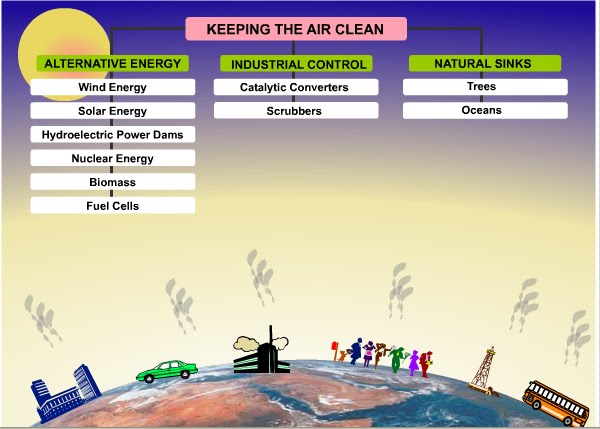
The first three parts: “About Air Pollution”, “Impact of Air Pollution” and “Keeping the air clean” are mainly stating some fact sheets about the air pollution. I suppose the cognitive tools used here are limited to some animations and concept maps. 

The lack of tools used here may result a one-way communication between teacher and students and it will be hard for students to develop a cognitive network between all the facts of “Elements of air”, “major Elements of polluted air” and “the cause of air pollution”.
When it comes to the final project page, only a simple picture with minimum explanation is showing. I doubt students will have same question as me”Where is it?” “If I want to examine places near my home, where can I get the tools to picture the same map with spotted dots?” Furthermore, although it stated what kind of information should be included in the project, it lacks of more useful information to tell students where to find information and how to evaluate your project.

Posted by Sophie Gu Jiaying

Monday, September 13, 2010

Lesson 1 Activity: The mini evolution of On-line Teaching and Learning systems I experienced

With the rapid development of Information Technology and the accelerating adoption rate of technology in modern society, Information Systems or information platforms are now widely used in the area of teaching and learning which enormously enhance the quality and efficiency of education.

I remember the first time I got in touch with on-line learning was in my last year of senior high school. I bet you all know the fierce competition of College-entrance-examination in Mainland China; every student went to different “Private Tutors” after school in order to get good grades for that exam. Instead of go to “Real Tutors”, I went to “Virtual Tutors”. It was like an on-line tutoring school, there were always best teachers for different subjects there for you; if you got a problem or cannot figure out a particular question, just go to their website and write down your questions, they will get back to you with detailed answers in few hours. Now, this kind of tutoring is not unusual, and some even will say that is not efficient. I absolutely agree with that. But think about it in China 10 years ago, no one could deny that this kind of on-line tutoring platform is new and effective, and of course making good profit. (You need to pay 1000RMB/semester for such services.)

When I began my UG study in Hong Kong, I got a chance to experience a more dynamic on-line learning system. The system I used was called “WebCT”, professors will upload the lecture notes and all kinds of learning materials on that system for students to download and student can take small quizzes on that system too. I believe the functionalities are more that these two I just described, but as a user of “WebCT”, I am not that benefit from it.

Later in year 2007, our University announced that they will no longer use “WebCT” for teaching and learning platform, and they gonna switch to another internally developed system called “Learning Management and Evaluation System”. I guess it was not only the expensive license fee the University needs to pay for “WebCT” that bothers, also the effectiveness and system control needs to be improved by using the new system. It was not an easy task for both faculties and students to transfer from “WebCT” to “LMES”, though the new system provides more functionality. Users were confronted with totally new interfaces and there are lots of new functions you need to learn how to use.


(Picture Source: The Hong Kong University of Science and Technology LMES 2.5 All rights reserved.)


After a painful transfer phase, users are gradually adopted the new system and try to utilize all the functions. LMES, as an internal developed teaching and learning system, is more integrated with HKUST’s teaching and learning style and quite innovative in terms of interface design.

As what I have experienced from using on-line teaching and learning systems, I realized that when the communication through systems become smoother and user generated contents are become more effective, the system then can be fully utilized.


By Sophie Gu Jiaying